
How to fix PlatformIO "Start debugging" doing nothing
Problem:
When you click on Start debugging, press F5 or click on the debug start triangle in PlatformIO
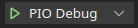
the firmware builds but then nothing happens:
platformio_build_output.txt
Linking .pio/build/olimex_e407/firmware.elf
Checking size .pio/build/olimex_e407/firmware.elf
Advanced Memory Usage is available via "PlatformIO Home > Project Inspect"
RAM:   [          ]   0.7% (used 936 bytes from 131072 bytes)
Flash: [          ]   1.7% (used 18064 bytes from 1048576 bytes)
Building .pio/build/olimex_e407/firmware.bin
======================================================================== [SUCCESS] Took 2.72 seconds ========================================================================Solution
You need to specify a debug_tool in platformio.ini. For STM32 processors, a typical choice is
platformio.ini
debug_tool = stlinkA list of options for debug_tool is available here.
Note that you can NOT debug many boards via the USB port. You can not debug boards attached via serial-to-USB converter (like many Arduino boards). Your board need to have a proper debugger on-board (like an stlink which is integrated on many STM32 eval boards) or you need to use an external debugger.
Check out similar posts by category:
PlatformIO, STM32
If this post helped you, please consider buying me a coffee or donating via PayPal to support research & publishing of new posts on TechOverflow