
Comparing simple and Shockley diode models for capacitor charging in Python using UliEngineering
You can easily compare a simple constant-drop diode model with a Shockley diode model for capacitor charging using the UliEngineering Python library.
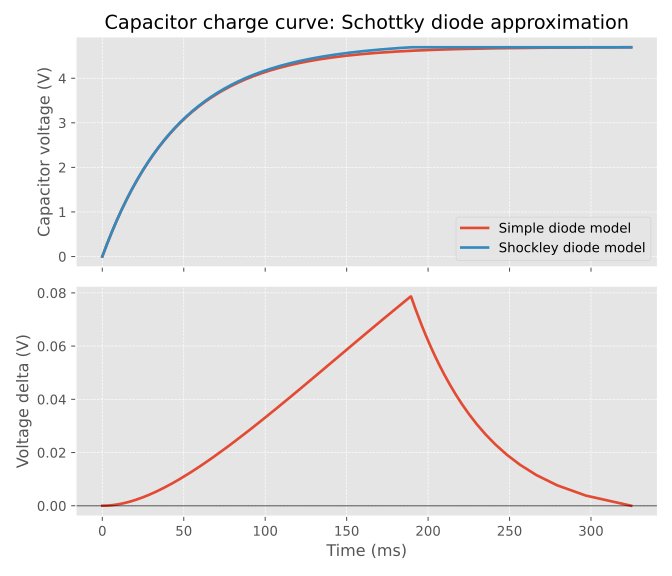
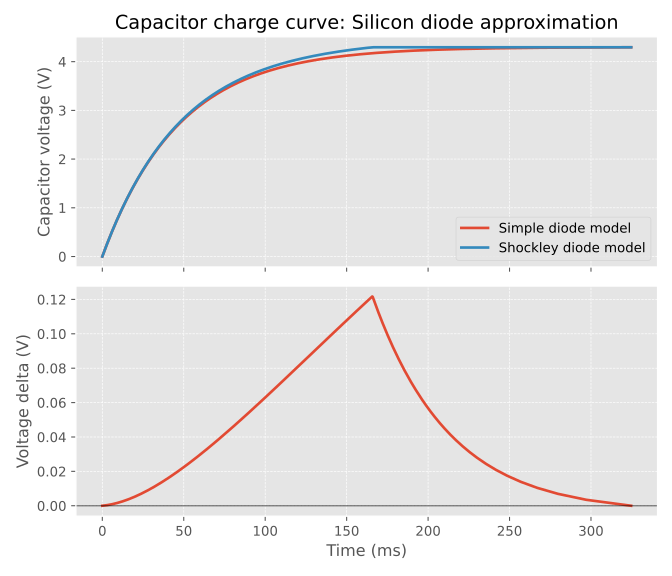
In this example, the simple model is matched against the Shockley model at a reference current of 10mA. The top subplot shows the absolute capacitor voltage during charging, and the bottom subplot shows the difference Shockley - simple.
from UliEngineering.Electronics.Capacitors import capacitor_resistor_charge_time
from UliEngineering.Electronics.Diode import *
import matplotlib.pyplot as plt
import numpy as np

plt.style.use('ggplot')

SOURCE_VOLTAGE = 5.0
CAPACITANCE = 100e-6
RESISTANCE = 470.0
REFERENCE_CURRENT = 10e-3


def build_models(simple_drop, ideality_factor):
  saturation_current = shockley_diode_saturation_current(
    simple_drop,
    REFERENCE_CURRENT,
    ideality_factor=ideality_factor,
  )
  return (
    SimpleDiodeModel(simple_drop),
    ShockleyDiodeModel(saturation_current, ideality_factor=ideality_factor),
  )


def charge_curves(simple_model, shockley_model):
  max_voltage = (SOURCE_VOLTAGE - simple_model.minimum_series_voltage()) * 0.999
  voltage_grid = np.linspace(0.0, max_voltage, 1200)

  simple_times = capacitor_resistor_charge_time(
    CAPACITANCE,
    RESISTANCE,
    SOURCE_VOLTAGE,
    voltage_grid,
    initial_voltage=0.0,
    diode_model=simple_model,
  )
  shockley_times = capacitor_resistor_charge_time(
    CAPACITANCE,
    RESISTANCE,
    SOURCE_VOLTAGE,
    voltage_grid,
    initial_voltage=0.0,
    diode_model=shockley_model,
  )

  common_time = np.linspace(0.0, max(simple_times[-1], shockley_times[-1]), 1200)
  simple_voltage = np.interp(common_time, simple_times, voltage_grid)
  shockley_voltage = np.interp(common_time, shockley_times, voltage_grid)
  return common_time, simple_voltage, shockley_voltage


def render_plot(title, simple_model, shockley_model, outfile):
  time_axis, simple_voltage, shockley_voltage = charge_curves(simple_model, shockley_model)
  difference = shockley_voltage - simple_voltage

  fig, axes = plt.subplots(2, 1, figsize=(7, 6), sharex=True)
  axes[0].plot(time_axis * 1000.0, simple_voltage, label='Simple diode model', linewidth=2)
  axes[0].plot(time_axis * 1000.0, shockley_voltage, label='Shockley diode model', linewidth=2)
  axes[0].set_ylabel('Capacitor voltage (V)')
  axes[0].set_title(title)
  axes[0].legend(loc='lower right')
  axes[0].grid(True, which='both', linestyle='--', linewidth=0.5)

  axes[1].plot(time_axis * 1000.0, difference, linewidth=2)
  axes[1].axhline(0.0, color='black', linewidth=1, alpha=0.5)
  axes[1].set_xlabel('Time (ms)')
  axes[1].set_ylabel('Voltage delta (V)')
  axes[1].grid(True, which='both', linestyle='--', linewidth=0.5)

  fig.tight_layout()
  fig.savefig(outfile)
  plt.close(fig)


render_plot(
  'Capacitor charge curve: Schottky diode approximation',
  *build_models(0.3, 1.05),
  'capacitor_charge_schottky_simple_vs_shockley.svg',
)

render_plot(
  'Capacitor charge curve: Silicon diode approximation',
  *build_models(0.7, 1.9),
  'capacitor_charge_silicon_simple_vs_shockley.svg',
)Schottky diode comparison
Silicon diode comparison
Why is the Shockley model so different?
The key point is that these two diode models answer different physical questions.
The simple diode model assumes a fixed forward drop, for example 0.7V for a silicon diode. That means the RC network always sees approximately:
with a constant V_D. In other words, the diode is treated like an always-on voltage offset.
The Shockley model does not keep the diode drop constant. Instead, the forward voltage depends on current approximately as:
$$ I = I_S \left(e^{\frac{V_D}{nV_T}} - 1\right) $$so when the charging current changes, the diode voltage changes as well.
In this example, both models are matched only at one operating point: 10mA. That means they agree best only near that current. At the very start of charging, the current is close to that reference value, so both curves begin almost on top of each other.
After that, the capacitor charges and the current falls. This is where the models separate:
- In the simple model, the diode still drops the same fixed voltage.
- In the Shockley model, the lower current produces a lower forward voltage.
- Because the Shockley diode now “uses up” less of the source voltage, more voltage is left across the resistor-capacitor path.
- That makes the capacitor charge faster, so the Shockley curve moves above the simple-model curve.
This is why the difference is most visible in the middle of the charging process. The simple model cannot react to changing current, while the Shockley model does exactly that.
Why does the delta peak?
The peak happens for two reasons: one physical, one numerical.
1. The physical reason
At t = 0, both models are close because the current is close to the matching point. As the current drops below 10mA, the Shockley forward voltage falls below the fixed-drop approximation, so the Shockley capacitor voltage pulls ahead more and more.
That makes the delta grow initially.
2. The plotting/simulation reason
The code does not compare the two models all the way to the unrestricted asymptotic end of the Shockley solution. Instead, it builds a voltage grid only up to:
max_voltage = (SOURCE_VOLTAGE - simple_model.minimum_series_voltage()) * 0.999So both curves are compared only until they reach about 99.9% of the simple model’s final voltage.
Then both voltage traces are resampled onto a common time axis using np.interp(). Once the Shockley model reaches that upper comparison voltage, its interpolated trace becomes flat at the end of the plot, while the simple model is still catching up.
That means:
- Early on, the delta is small because both models start from the same initial voltage.
- In the middle, the Shockley model gets ahead because its forward drop decreases with current.
- Near the end, the Shockley trace has already reached the chosen comparison ceiling, so the simple model gradually catches up.
- As a result, the plotted delta shrinks again and eventually returns toward zero.
So the peak is not just a “mystery feature” of the diode equation. It comes from the combination of current-dependent diode behavior and the fact that this particular plot compares both models only over a fixed voltage range.