
如何使用 SSH 连接到 OpenStage 40
首先,在 Web 界面上启用 SSH 访问:
Admin pages -> Maintenance -> Secure Shell
输入随机密码,如图所示选择其他设置。
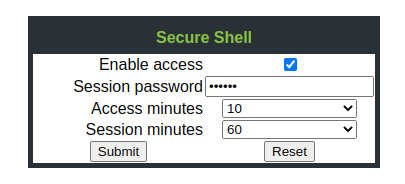
点击提交。在此阶段,选择 ssh admin@192.168.178.245 会导致以下错误消息:
openstage_ssh_output.txt
Unable to negotiate with 192.168.178.243 port 22: no matching key exchange method found. Their offer: diffie-hellman-group1-sha1,diffie-hellman-group14-sha1,kexguess2@matt.ucc.asn.au因此我们必须使用以下命令:
ssh_openstage_use_kex.sh
ssh -oKexAlgorithms=+diffie-hellman-group1-sha1 admin@192.168.238.245Check out similar posts by category:
Networking
If this post helped you, please consider buying me a coffee or donating via PayPal to support research & publishing of new posts on TechOverflow