
如何在 XCP-NG 中为 UEFI VM 设置屏幕尺寸
以下步骤允许你进入 UEFI 设置并设置屏幕尺寸。它不适用于运行 BIOS 的 VM!
- 打开 VM 的控制台
- 启动 VM
- 立即开始反复按
F2,直到你看到 UEFI 设置屏幕: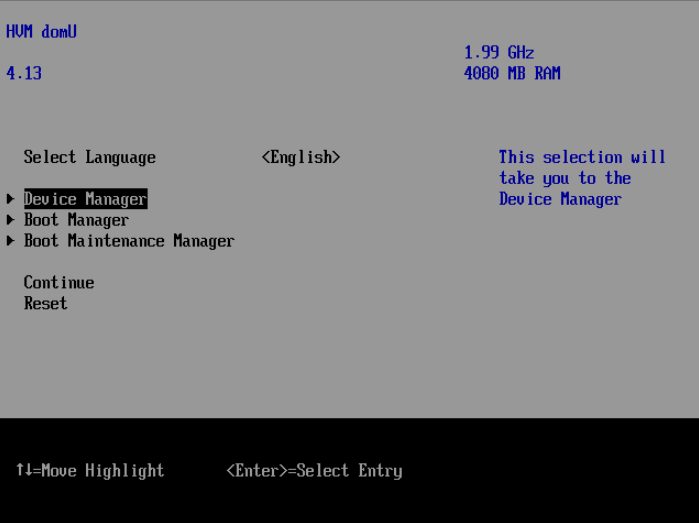
- 进入
Device Manager: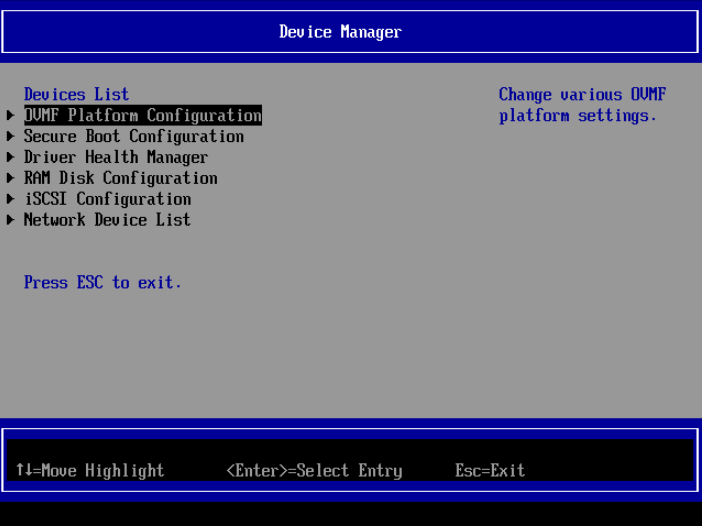
- 进入
OVMF Platform Configuration并选择屏幕分辨率: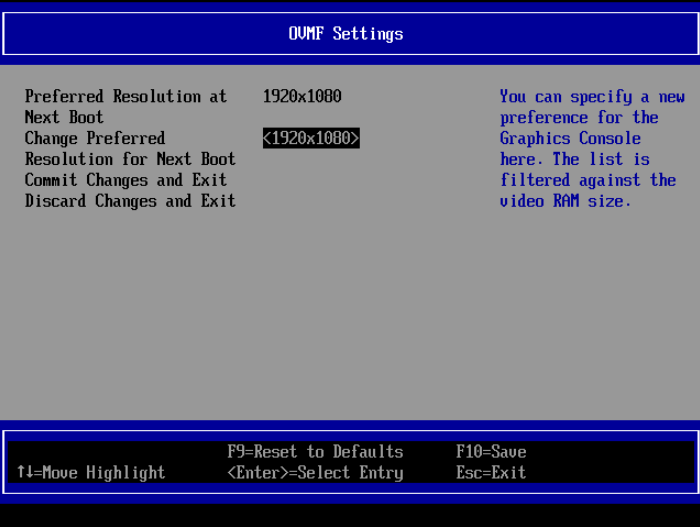
- 按
ESC退出并选择Y保存更改。继续按ESC直到回到启动屏幕: - 现在选择
Reset并等待操作系统启动。你需要选择Reset,因为更改只有在下次完全重启后才生效。
Check out similar posts by category:
Virtualization
If this post helped you, please consider buying me a coffee or donating via PayPal to support research & publishing of new posts on TechOverflow